


Make Your First API Call (Hello-michelin API)
Learn how to interact with the API using Keyless access, API Key, and OAuth2 authentication methods.
This article helps beginners make their first successful API call to the Hello-michelin API. You will learn how to subscribe to the API Product and how to interact with the API using Keyless access, API Key, and OAuth2 authentication methods.
What you will call
You will learn how to make three different API calls to the Hello Michelin API, demonstrating various authentication methods:
- Keyless Access: A simple call without any authorization requirements.
- API Key Access: A call that requires an API Key for authentication.
OAuth2 Access: A call that utilizes the OAuth2 Client Credentials flow for secure access.
You will be using the 3 differents endpoints with different authentication methods:
- API name: Hello-michelin API
- Base URL (DEV): https://dev.api.michelin.com/p0r/v1
- Endpoint:
- GET /hello-michelin/keyless
- GET /hello-michelin/apikey
- GET /hello-michelin/oauth
- Security:
- Keyless (no authorization)
- API Key
- OAuth 2.0 (Client Credentials)
- Successful response (200):
Body:
{ "message": "Hello Michelin" }
Prerequisites checklist
Before calling the endpoint, ensure:
- You require an api client application like Bruno.
- You need an active subscription to the Hello-michelin API product. Get your trial access from the plan of usage page.
When handling credentials or any sensitive data, follow Michelin standards for secure processing and storage.
Download API Clients collections

Bruno
Collection : Bruno

Open Collection
Collection : Open Collection format
Making API Calls Without Authentication (Keyless)
Keyless Endpoint
- Endpoint:
GET /hello-michelin/keyless - Description: Generates a Hello Michelin response without any authentication.
GET /hello-michelin/keyless
Making API Calls Using API Key
API Key Endpoint
- Endpoint:
GET /hello-michelin/apikey - Description: Generates a Hello Michelin response using an API Key.
- Parameter: Add the API Key as a header parameter (name: apikey)
GET /hello-michelin/apikeyYour API Key will be issued by Michelin as part of the subscription process within the API product's usage plan tab.
Making API Calls Using OAuth2
OAuth2 Endpoint
- Endpoint:
GET /hello-michelin/oauth - Description: Generates a Hello Michelin response using OAuth2 authentication. This can be achieved in two ways:
GET /hello-michelin/oauthYou can obtain an access token either by sending a dedicated OAuth request (see below) or directly from your API client’s Authorization tab. For a Bruno example, see the section "Option 2: Retrieve your Access Token simultaneously with your GET request".
Your OAuth credentials (client_id & client_secret) will be provided by Michelin during the subscription process within the API product's usage plan tab.
Get your Access_Token from a POST request
- Send a POST request to the OAuth endpoint to retrieve your token. Include your client ID and client secret:
- Token URL: `https://dev.api.michelin.com/idp/v1/internal/oauth/token/accesstoken`
- grant_type : client_credentials
- Auth type : Basic Auth
- Username : YOUR_MICHELIN_CLIENT_ID
- Password : YOUR_MICHELIN_CLIENT_SECRET
Environment: Ensure you are targeting the correct environment (this example uses DEV).
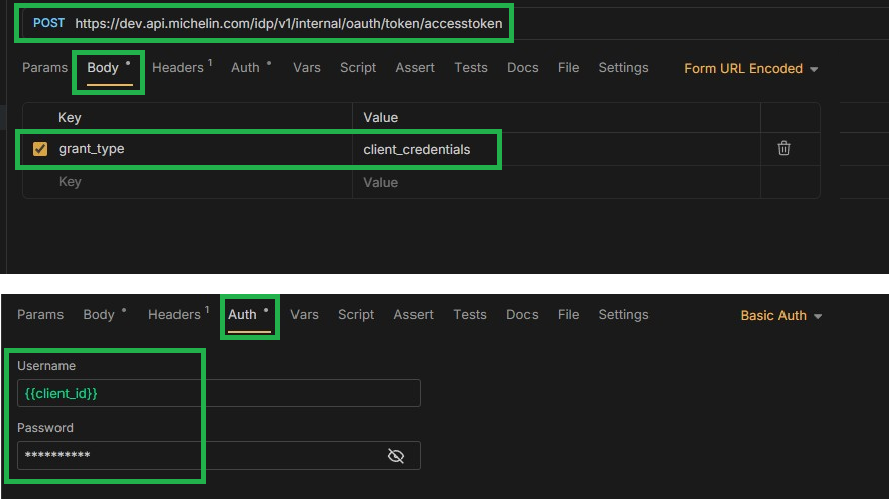
Example Call
Using curl:
curl -X POST \
  "https://dev.api.michelin.com/idp/v1/internal/oauth/token/accesstoken" \
  -H "Content-Type: application/x-www-form-urlencoded" \
  -d "grant_type=client_credentials" \
  -u "YOUR_CLIENT_ID:YOUR_CLIENT_SECRET"
Expected Response for Access Token
That first call will allow you to retrieve you access token from the response :
{
  "access_token": "YOUR_ACCESS_TOKEN",
  "token_type": "bearer",
  "expires_in": 7199
}
Call Hello Michelin API with your Access Token
You can now use that Access Token to make your call to Hello Michelin API :
Replace YOUR_ACCESS_TOKEN with your actual value retrieved from OAuth query.
curl -X GET \
  "https://dev.api.michelin.com/p0r/v1/hello-michelin/oauth" \
  -H "Authorization: Bearer YOUR_ACCESS_TOKEN" \
  -H "Accept: application/json"
Expected Successful Response
{
  "message": "Hello Michelin from OAuth2"
}You will utilize the Auth tab of your API client to input your authentication details.
Token URL
- https://dev.api.michelin.com/idp/v1/internal/oauth/token/accesstoken
Parameters
- client_id
- client_secret
Request Example
- Create a new GET request:
- URL: https://dev.api.michelin.com/p0r/v1/hello-michelin/oauth
Authorization:
Type: OAuth 2.0
- Grant Type: Client Credentials
- Access Token URL:
https://dev.api.michelin.com/idp/v1/internal/oauth/token/accesstoken - Grant type: Client Credentials
- Client ID / Client Secret: your app credentials provided during your subscription process within the API product's usage plan tab
- Token ID : credentials
- Add token to : header
- Header prefix : Bearer
Automatically fetch token if not found : yes
- Get Access token:
Hit the Get Access button from OAuth tab in order to retrieve your Access_Token.
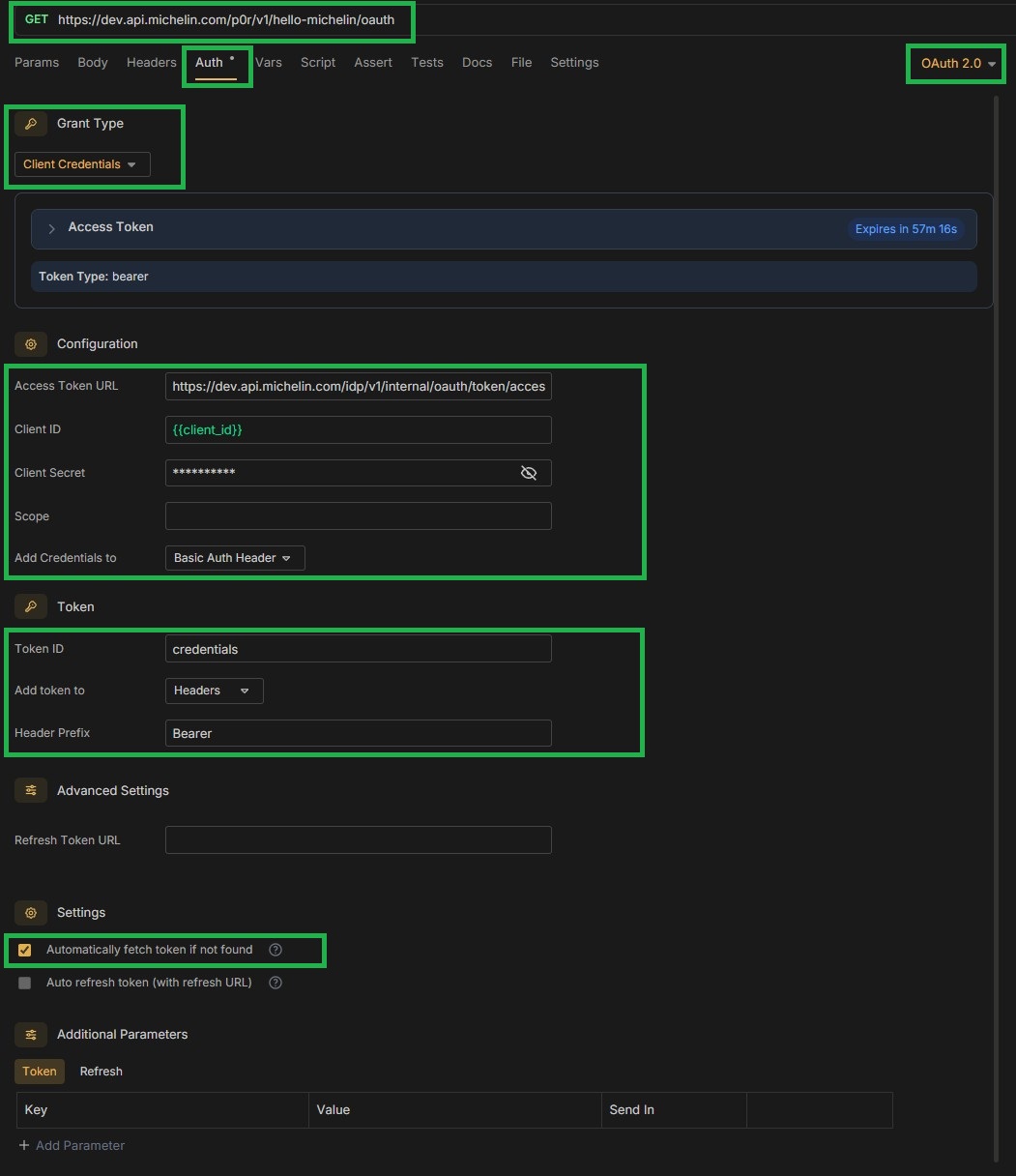
Send the request and verify the response

Expected success (200):
{
  "message": "Hello Michelin from OAuth2"
}
Common Errors and How to Fix Them
400 URL not found
Symptoms:
{"message":"URL not found","http_status_code":404}- Fix: Validate the query url and ensure using correct method/path.
401 Unauthorized
Symptoms:
{"message":"Unauthorized request","http_status_code":401}- Fix: Ensure the Authorization header includes a valid token and includes the correct scope.
429 Rate Limit Exceeded
Symptoms:
{"message":"Spike limit exceeded! You reached the limit of requests allowed in a specific time frame.","http_status_code":429}- Fix: Respect plan limits and consider a higher plan if hitting limits frequently.
500 Internal Server Error
Symptoms:
{"message":"Server unavailable","http_status_code":500}- Fix: Retry after a short delay and check the service status.
Production readiness checklist
Ensure to:
- Use correct environment URLs.
- Securely store client secrets and manage token lifecycle.
- Implement error handling strategies for 401, 429, and 5xx responses.
- Monitor usage against your subscription limits.
Track release notes for this product to anticipate changes.
Need help ?

Knowledge Base

Email

Teams channel
For Michelin users only : Tag @ApiPortal in the “Your Questions” channel in our OneSystem - Integration Experience Teams channel