


Order-To-Cash North America
API of Michelin North America Order-to-cash services
Authentication details
Oauth2 Authentication
Overview:
OAuth2 (Open Authorization 2.0) is an industry-standard protocol for authorization. It allows customer applications to access their resources without exposing their credentials. OAuth2 is widely used for securing API access by issuing tokens that represent permissions to access specific resources.
Key Benefits:
- Security:
OAuth2 separates the role of the resource owner from the client, minimizing the risk of exposing sensitive credentials.
- User Experience:
Enables seamless authorization experiences, reusable for all the APIs with different backend systems.
OAuth2 Roles and Flow
Roles:
- Client: The application requesting access on behalf of the user.
- Resource Owner: The entity that owns the resources and can grant access to them (typically the user).
- Authorization Server: The server that authenticates the resource owner and issues tokens to the client.
- Resource Server: The API server that provides access to the resources, validating the token to authorize access.
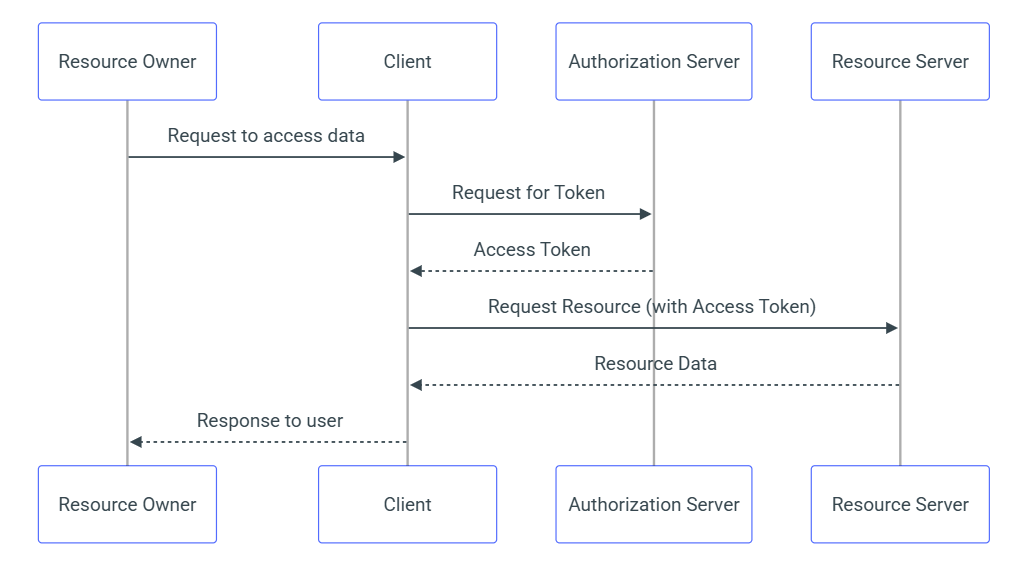
OAuth2 Flows:
Client Credentials Grant:
- Use Case: Server-to-server or system-to-system communication where no user is involved.
- Flow: The client sends its credentials to the authorization server and receives an access token.
Obtaining Client Credentials
Client Registration:
- Process: So far, there is no self service available for customers to register their clients. The registration process is part of our customer integration engagement process to enable Oauth2. Customer must raise request to Michelin account manager for requirements of setting up new system-to-system integration or change to the existing integration including Oauth2. Once the request is approved, Michelin will issue the credentials to customer by internal processing.
- Registration Information: When customer raises the request, these details must be mentioned:
- Client application name
- Owner entity of the client application
- Support entity of the client application, if it is different from the owner entity
- Support contacts of the client application
Security Note:
Client Secret must be stored and configured in client backend system in a secured way and must not be exposed in front-end code or public repositories. Client Secret should be encrypted instead of plain text when it is stored.
Requesting Access Tokens
Authorization Server Endpoints:
The URL of our authorization service for retrieving the OAuth2 access token.
- Testing environment: https://indus.api.michelin.com/idp/v2/b2b/oauth2/token
- Production environment: https://api.michelin.com/idp/v2/b2b/oauth2/token
Token Request Parameters:
- client_id: The identifier of the client application.
- client_secret: The secret key used to authenticate the client.
- grant_type: The type of OAuth2 flow being used (set as “client_credentials”).
Examples:
- Token Request:
curl --request POST \ --url https://indus.api.michelin.com/idp/v2/b2b/oauth2/token \ --header 'Content-Type: application/x-www-form-urlencoded' \ --data grant_type=client_credentials \ --data client_id=3MVG9WcjRvm13aM4K_************.0XSjZWUFcTwElp \ --data client_secret=38AFD8C80F39*****E379A7A5D- Token Response: The string highlighted below in blue is the access token
{ "access_token": "00D9b000004Qmmi!AQEAQG34mOW2FtFjM", "signature": "fdgEV0NBfQJCgHD38DAynJ4rfb76bg3xd1D+znhTfyo=", "scope": "openid api", "instance_url": "https://xxxxx", "id": "https://xxxxxx/id/00D9b000004QmmiEAC/0051i000005JN7VAAW", "token_type": "Bearer", "issued_at": "1727983572407"}Using Access Tokens
Authorization Header:
Include the access token in API requests by adding it to the Authorization header.
Example:
The access token has to be included in the request header shown below when calling a functional API for order status as an example
curl --request POST \ --url https://indus.api.michelin.com/order/amn/C1_1/status \ --header 'Authorization: Bearer 00D9b000004Qmmi!AQEAQG34mOW2FtFjM' \ --header 'Content-Type: application/json' \ --data '{ "documentID": "C1", "variant": 0, "orderDateFrom": "2024-11-01", "orderDateTo": "2024-12-31", "orderStatusIndicator": "2", "buyerParty": { "partyID": "xxxxx", "agencyCode": 91 }, "consignee": { "partyID": "", "agencyCode": 91 }}'Token Expiry:
The access token’s typical lifespan is 120 minutes. Within the lifespan, it is recommended to reuse the token as much as possible to ensure the API performance. But the client application should manage the occasional token expiration in case the token is revoked at authorization server side. So far, the token is opaque which is not carrying expiration itself. Later when JWS token is used, the expiration can be derived from the token.
Token Refresh:
Usually, the token expiry is not able to be extended. Client application should get a new token by simply calling the “Authorization Server Endpoints” again.
Token Introspection (Optional):
Access token can be introspected by calling the URL to validate if the token is still valid. It is optional for developers to decide whether to take this approach.
- Testing environment: https://indus.api.michelin.com/idp/v2/b2b/oauth2/token
- Production environment: https://api.michelin.com/idp/v2/b2b/oauth2/token
Example:
- Introspection request Access token can be introspected by calling the endpoints with the same client id and client secret which are used for retrieving the OAuth2 access token.
curl --request POST \ --url https://indus.api.michelin.com/idp/v2/b2b/oauth2/introspect \ --header 'Content-Type: multipart/form-data' \ --form 'token=00D9b000004QmEGnYSBYiLxR0vBtg8vujqk2RKyB934mOW2FtFjM' \ --data client_id=3MVG9WcjRvm13aM4K_************.0XSjZWUFcTwElp \ --data client_secret=38AFD8C80F39*****E379A7A5D - Introspection response The attribute “exp” in the response is representing the expiry time. It is in Unix Epoch seconds which can be converted to coding language specific time format by certain library or calculation
For instance, 1727992153 can be converted to Thu, 03 Oct 2024 21:49:13 GMT
{ "active": true, "scope": "api openid", "client_id": "3MVG9WcjRvm13aM4K_************.0XSjZWUFcTwElp ", "username": "iams2s.belltire@michelin.com.uat", "sub": "https://test.salesforce.com/id/00D9b000004QmmiEAC/0051i0", "token_type": "access_token", "exp": 1727992153, "iat": 1727984953, "nbf": 1727984953} Error Handling
Common Errors:
- Unsupported grant type: Missing or malformed parameters or request body.
Example: 400 Bad Request - "error": " unsupported_grant_type "
Troubleshooting: - Make sure parameter Content-Type is set as "application/x-www-form-urlencoded"
- Invalid Client: The client authentication failed.
Example: 400 Bad Request - "error": "invalid_client"
Troubleshooting: Make sure parameter grant_type is set as “client_credentials” - Check that the client ID and secret are correct and properly encoded.
- Unauthorized: The token is revoked, expired or incorrect.
Example: 401 Unauthorized - " " (empty body)
Troubleshooting: Check that the client ID and secret are correct and properly encoded. - Verify if the token is expired and refresh tokens if needed.
- Forbidden: The token does not have the permissions to access to the requested resource.
Example: 403 Forbidden - " {} "
Troubleshooting: Verify if the requested data ownership is matching the authorization rules, e.g. BuyerParty ID is correctly set as customer's Bill-to code.
Security Best Practices
Securing Client Credentials:
- Never hardcode client secrets in your application’s source code.
- Never store or configure client secrets in front-end or publicly accessible environments.
- Use environment variables or secure vaults for storing sensitive information.
- Using HTTPS: Ensure that all communications with the authorization server and API endpoints are conducted over HTTPS to prevent man-in-the-middle attacks.
- Token Management: Implement token refresh and API call retry to reduce the risk of API call failure.
Example Scenarios:
Scenario 1: Client Credentials Flow for Server-to-Server Communication:
- Step 1: The client requests an access token using its client ID and secret.
- Step 2: The client receives the token and uses it to access the API.
Scenario 2: Client Credentials Flow for Server-to-Server Communication with token reuse and error handling:
- Step 1: The client uses the access token to access the API.
- Step 2: The client receives 401 Unauthorized error, and requests a new access token using its client ID and secret
- Step 3: The client uses the new access token to access the API as a retry.
APIKey + BAsic authentication
This is not the recommended option, it is just to be backward compatibility. Michelin can help you to use OAuth2.
Guidelines on how to use this API
To request your access, please contact your representative.
Release notes
v1.0.0
Publication of the 1st version