

TyreSnap - Full Tyre API
AI-powered API that detects tyre size and other markings given a picture of full tyre sidewall (passenger tyre only)
Authentication details
API Key
API key validation is the simplest form of app-based security that you can configure for an API. A client app simply presents an API key with its request, then API manager checks to see that the API key is in an approved state for the resource being requested. Internally, your proxies use policies to verify API key authenticity.
High-Level Steps:
- When a consumer registers an app for any API product in Apigee developer portal, a client id and client secret is created.
- Client Id is treated as API Key and used to authenticate the consumer for subsequent API calls.
- Send header parameter as 'apikey'
OAuth 2
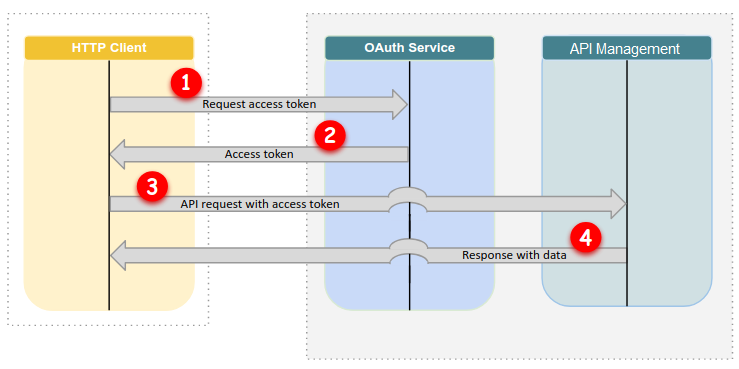
OAuth 2 is an authorization mechanism for every request from the same consumer (only client_credentials grant type is supported at this moment within the Michelin Apigee platform). Using client id and client secret, the consumer gets an access token that can be used for authorizing API calls. Once the token expires after a predefined time, a new token has to be generated and used again.
Request Parameters : grant_type (required)
The grant_type parameter must be set to client_credentials.
scope
Oauth scope is defined for the APIs and information will be available in the specification file under the security schema.
Client Authentication (required)
Client credentials need to be sent in the payload in a multipart/form. Please use the below format client_id and client_secretSample CURL Command for reference:
curl --request POST \
--url 'https://indus.api.michelin.com/idp/v1/internal/oauth/token/accesstoken?grant_type=client_credentials' \
--header 'apikey: {YOUR_KEY}' \
--data client_id={YOUR_KEY}\
--data client_secret={YOUR_SECRET}
OAuth2 flow:
Guidelines on how to use this API
Quick Start
You can use the following shell commands to quickly test the API:
# set varstoken_url=https://api.michelin.com/idp/v1/internal/oauth/token/accesstoken?grant_type=client_credentialsclient_id=<your-client-id-or-api-key>client_secret=<your-client-secret>api_url=https://api.michelin.com/tire-size-recognition/v1/scoreclient_name=<your-app-name>uid=01 # a unique id to help track your requestimg=Downloads/test.jpg # path to some image file# get tokenaccess_token=`curl -k -X POST -d "client_id=$client_id&client_secret=$client_secret" $token_url | grep access_token | cut -d'"' -f4`# make api callcurl -k -X POST -H "Authorization: Bearer $access_token" -H "apikey:$client_id" -H 'Content-Type: multipart/form-data' -F requester_name=$client_name -F unique_request_id=$uid -F tire_image=@$img $api_urlGuidelines on Image Quality
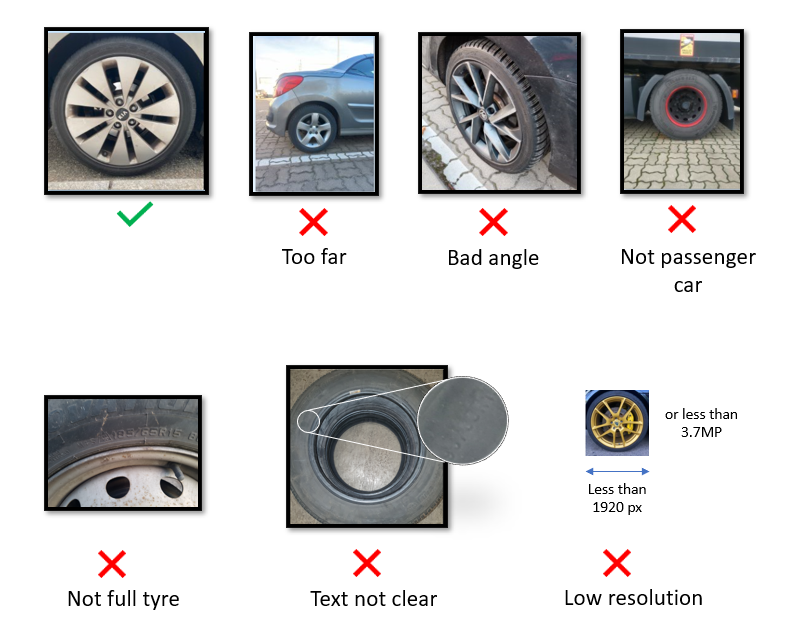
• Image should be taken in daylight for best results. Indoor parking/low lighting results may not be good.
References
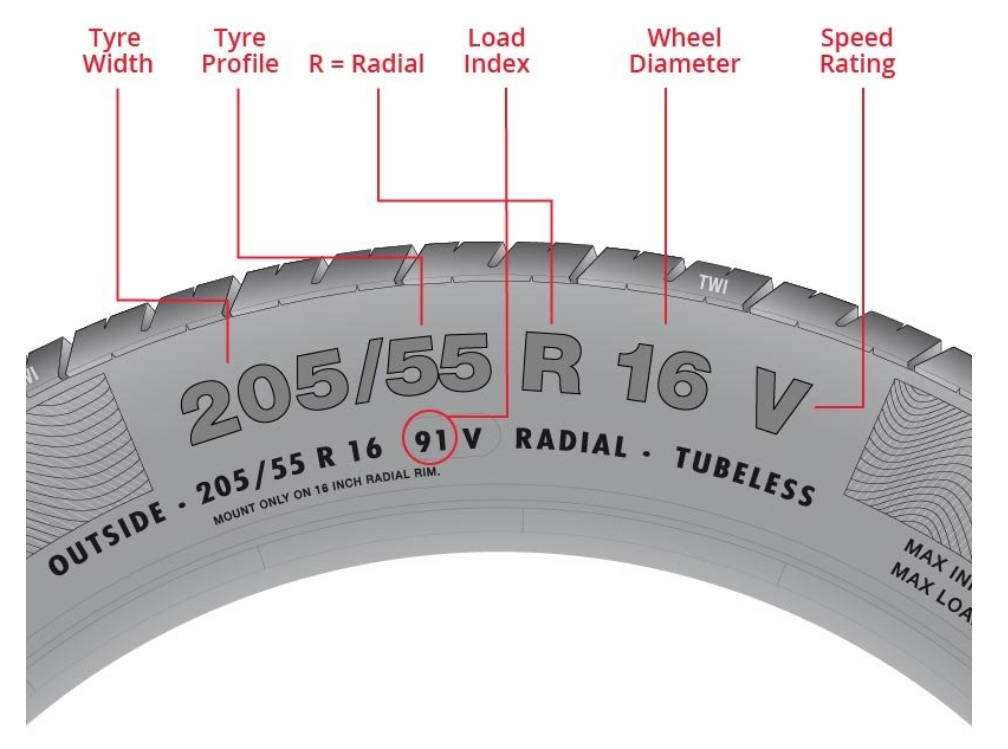
Know Your Tyre Better
Release notes
t
t
Show more release notes (1)
v1
Initial Draft for FullTyre version of Tire Size Recognition API